MP3Nest
Music, album and movie songs download script for Laravel 13. Thank you for your purchase! This guide takes you from upload to a live site in about ten minutes.
Features
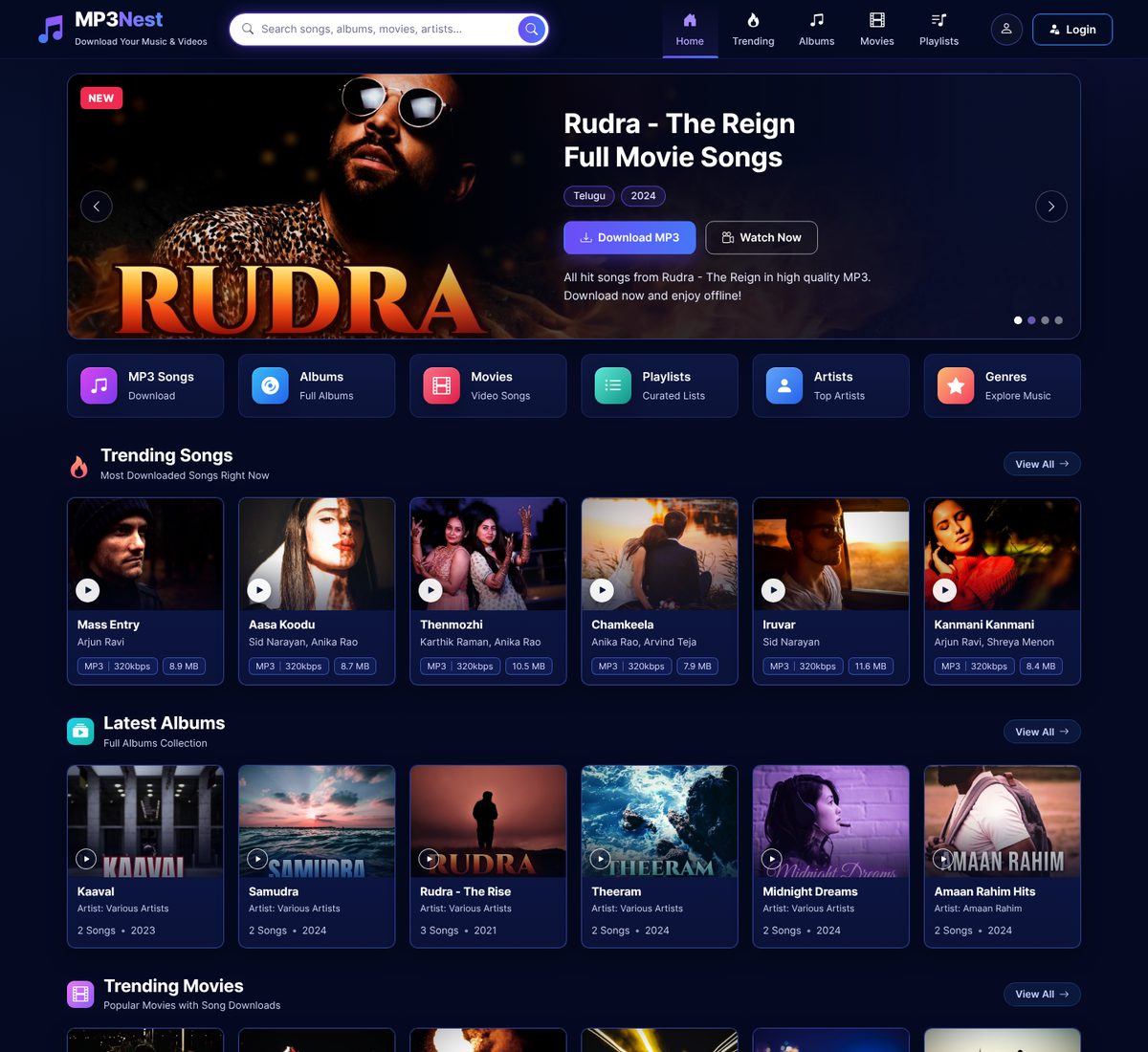
Server requirements
| Item | Requirement |
|---|---|
| PHP | 8.3 or 8.4 |
| Database | MySQL 5.7+ / 8.x or MariaDB 10.4+ |
| PHP extensions | PDO MySQL, OpenSSL, Mbstring, Fileinfo, GD, Zip, cURL, DOM/XML, Ctype, JSON, Tokenizer |
| Web server | Apache with mod_rewrite (most shared hosting) or Nginx |
| Optional | ffmpeg (automatic 256/192/128 kbps versions), a cron job, the PHP FTP extension (only for FTP storage) |
| Not needed | Composer, Node.js or SSH – everything is included |
Single songs of any size can be uploaded even with a small PHP limit: the upload form sends big files in parts. For ZIP and album uploads set upload_max_filesize and post_max_size to at least 64M. The largest song size is UPLOAD_MAX_MB in .env (default 50).
Package contents
mp3nest/ | The script (upload this). Includes the vendor/ folder, so no Composer is needed. |
documentation/ | This guide. |
START-HERE.txt | The five-step quick start. |
Installation (cPanel / shared hosting)
1. Create a database
- Open cPanel → MySQL Databases.
- Create a database (for example
youruser_mp3nest) and a user with a strong password. - Add the user to the database with All Privileges.
2. Upload the files
- Open File Manager and go to
public_html(or the folder of your sub-domain). - Upload
mp3nest.zip(zip themp3nestfolder content) and extract it there. The folder must containapp,public,vendor,.htaccessand so on. - The included
.htaccesssends all visitors to thepublicfolder and blocks access to private files. Best practice is to point the domain's document root to thepublicfolder (cPanel → Domains → Document Root).
3. Run the installer
- Open your domain. The installer starts automatically at
/install. - Check the requirements, enter the database details, then your site name and admin account.
- Choose an admin folder name (for example
studio-panel) – your panel will be atyourdomain.com/studio-panel. - Tick Import demo content to start with sample songs, albums and images (you can delete them later).
- When the installer finishes it locks itself;
/installthen returns "not found".
storage/, bootstrap/cache/ and public/uploads/ must be writable (755 or 775). .env must be writable during installation.Cron job
Add this command in cPanel → Cron Jobs, every minute (replace the path with the one shown in Admin → System Settings):
* * * * * php /home/youruser/public_html/artisan schedule:run >> /dev/null 2>&1The cron job removes old ZIP and temporary files every day and resets the demo every three hours when demo mode is on. Admin → System Settings shows when it last ran.
Sub-folder, VPS & Nginx
Sub-folder (e.g. yourdomain.com/music): upload into public_html/music; the installer detects the URL automatically.
VPS with Nginx: point the root to /var/www/mp3nest/public and use the standard Laravel rule:
server {
    server_name music.example.com;
    root /var/www/mp3nest/public;
    index index.php;
    client_max_body_size 100M;
    location / { try_files $uri $uri/ /index.php?$query_string; }
    location ~ \.php$ { include fastcgi_params; fastcgi_pass unix:/run/php/php8.3-fpm.sock; fastcgi_param SCRIPT_FILENAME $realpath_root$fastcgi_script_name; }
    location ~ /\.(?!well-known) { deny all; }
    location ^~ /uploads/ { location ~ \.php$ { deny all; } }
}
Give the web server user write access: chown -R www-data:www-data storage bootstrap/cache public/uploads .env.
Admin panel
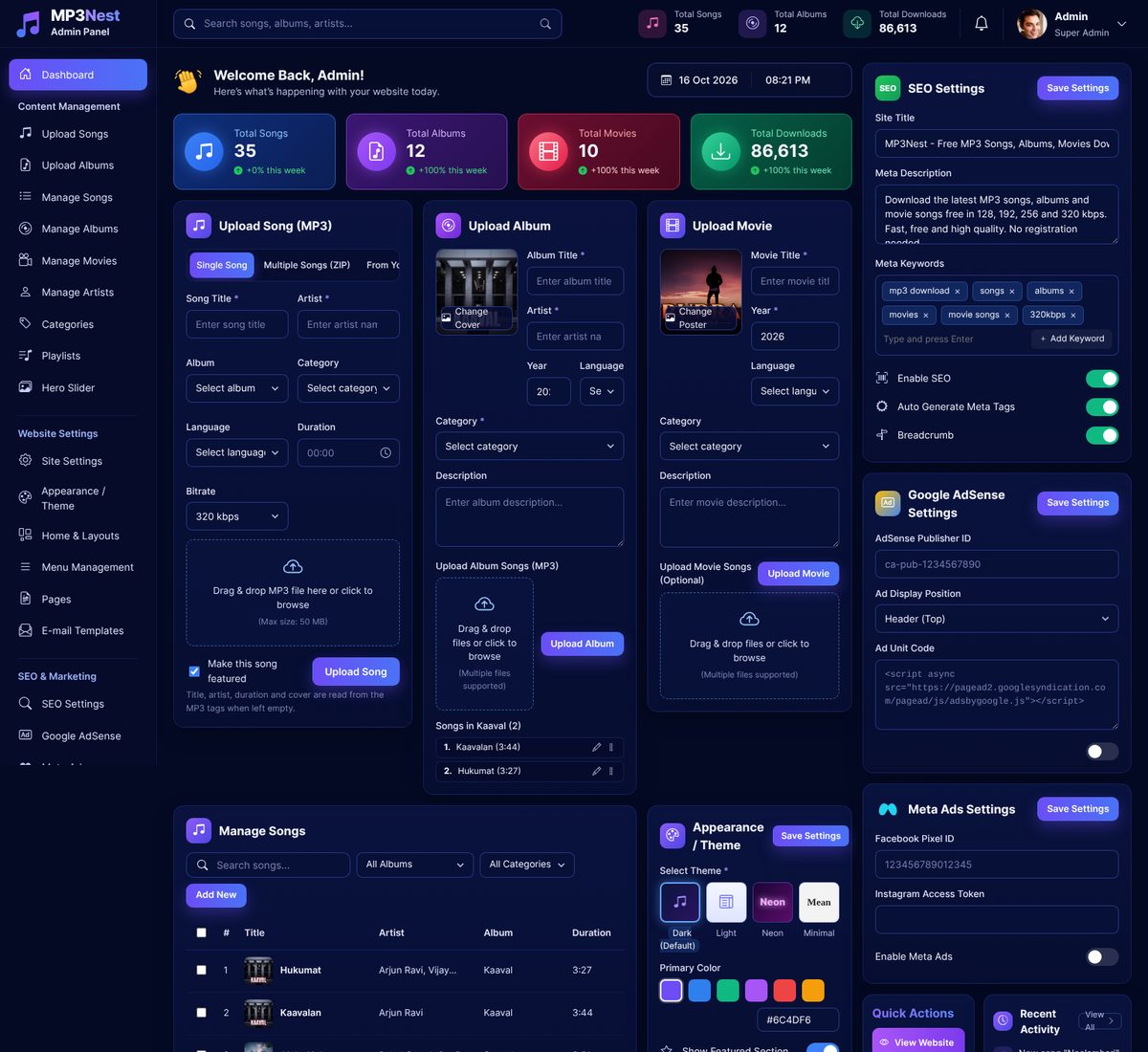
The dashboard combines the most-used tools on one screen: statistics, quick upload of a song, album or movie, the latest songs, SEO, AdSense, Meta Ads, theme and feature switches, quick actions and recent activity. Every widget saves only its own fields.
| Menu | What it does |
|---|---|
| Content Management | Songs, albums, movies, artists, categories (genres & languages), playlists and the hero slider |
| Website Settings | Site settings, appearance, home & layouts, menus, pages, e-mail templates |
| SEO & Marketing | SEO, Google AdSense, Meta Ads, analytics and donations |
| User & System | Users, comments, inbox & song requests, reports (DMCA), backups, system, administrators, mail, social login, payment gateways, features, security, activity log |
Roles: Super Admins can open everything. Managers can manage content and settings, but not backups, system and administrators.
Uploading music
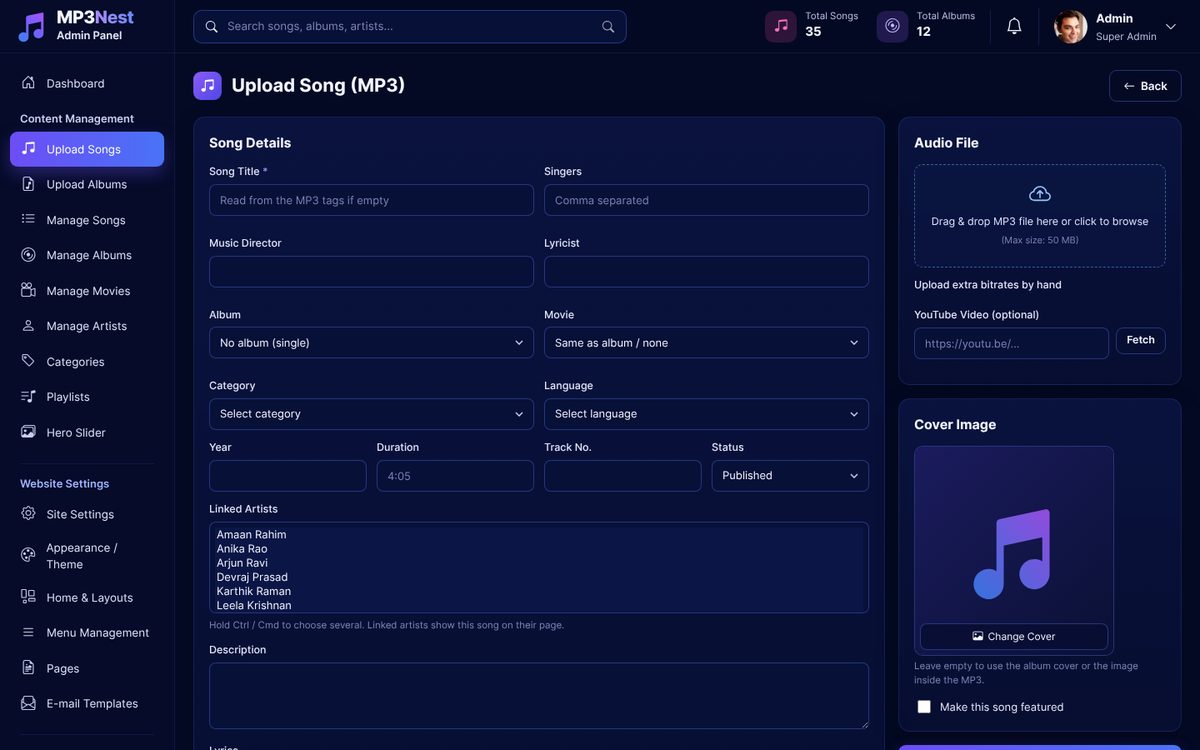
- Single song – Admin → Upload Songs. Choose the MP3; empty fields (title, artist, duration, year, cover) are filled from the MP3 tags.
- Album – Admin → Upload Albums. Add a cover and select several MP3 files at once. Drag the tracks to change the order.
- Many songs – Dashboard → Upload Song → Multiple Songs (ZIP). Every MP3 in the ZIP becomes a song.
- CSV import – Admin → Backup & Restore → Import. Columns:
title, singers, album, language, genre, year, duration, youtube_url, lyrics. Songs are imported as drafts. - Video songs – Paste a YouTube link in From YouTube (Auto). The title and thumbnail are filled in and the video is embedded on the song page (videos are not downloaded from YouTube).
- Qualities – the uploaded file is offered in its own bitrate. To offer all four qualities either upload the extra files by hand (song form → "Upload extra bitrates") or install ffmpeg, set
FFMPEG_PATH=/usr/bin/ffmpegin.envand switch on Features → "Create 256/192/128 kbps automatically".
- Big files – files larger than your PHP upload limit are sent in parts automatically.
- Direct links – song form → "Use direct links instead of uploading": paste an MP3 link per bitrate. Only public addresses are accepted.
storage/app/private/songs, outside the public web folder, or on the cloud storage you choose (see Cloud storage). Visitors only get a signed link that expires.Cloud storage (R2, S3, Bunny, FTP …)
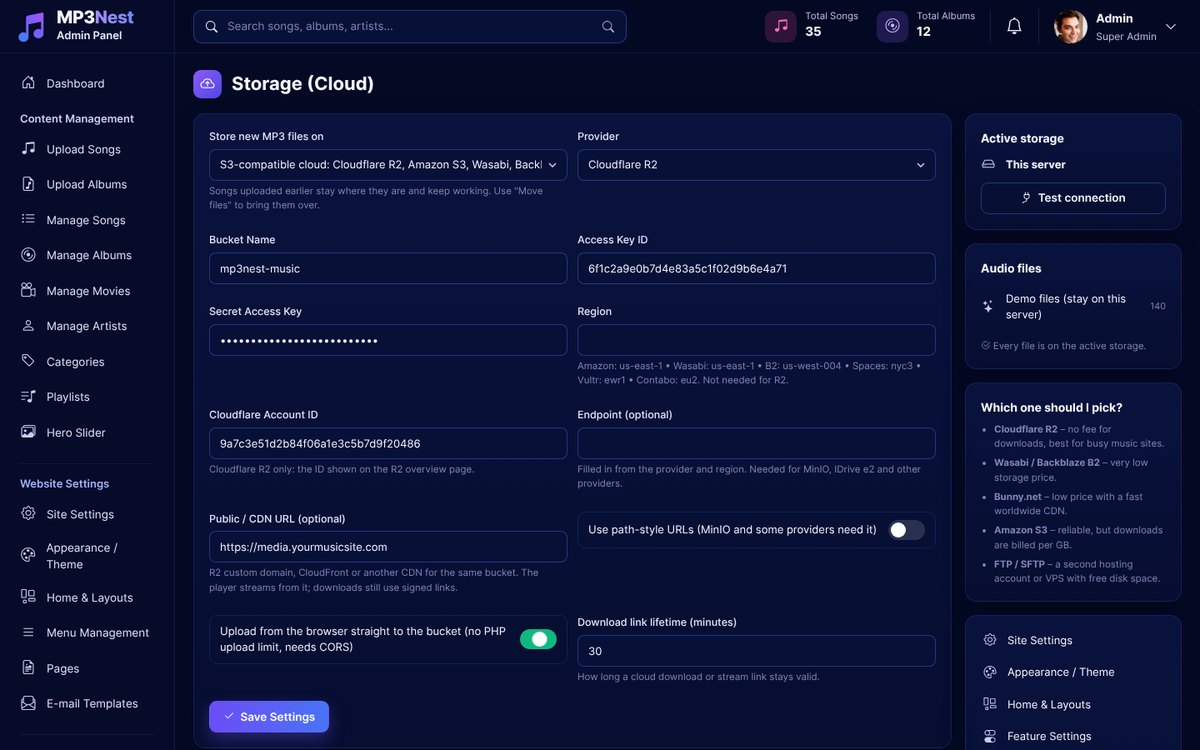
By default MP3 files are kept on your hosting. In Admin → Storage (Cloud) you can keep new uploads on a cloud storage instead. It saves disk space and bandwidth on your hosting. Visitors stream and download straight from the storage, with links that expire after the time you set (30 minutes by default).
| Storage | Good for |
|---|---|
| Cloudflare R2 | No fee for downloads (egress). The best choice for busy music sites. |
| Amazon S3 | Reliable everywhere, but downloads are billed per GB. |
| Wasabi, Backblaze B2 | Very low storage prices. |
| DigitalOcean Spaces, Vultr, Akamai / Linode, Contabo, IDrive e2 | S3-compatible storage from VPS providers. |
| MinIO / other S3-compatible | Your own storage server. Enter its endpoint and switch on "path-style URLs". |
| Bunny.net Storage + CDN | Low price and a fast CDN in every region. |
| FTP / SFTP | A second hosting account or VPS with free disk space. |
| Direct links | Files you already host elsewhere: paste the MP3 link per bitrate in the song form. |
Cloudflare R2 (recommended)
- Cloudflare dashboard → R2 → Create bucket (e.g.
mp3nest-music). Copy the Account ID from the R2 overview page. - R2 → Manage R2 API Tokens → Create API token with Object Read & Write for this bucket. Copy the Access Key ID and Secret Access Key.
- MP3Nest → Storage: Store new MP3 files on = S3-compatible, Provider = Cloudflare R2, then enter the bucket, keys and Account ID. Leave Region and Endpoint empty.
- Optional: connect a custom domain to the bucket (bucket → Settings → Public access) and enter it as Public / CDN URL. The player then streams through Cloudflare's CDN.
- Save. The page runs a connection test (upload, read, delete) and shows the result.
Amazon S3, Wasabi, Backblaze B2, Spaces and others
- Create a bucket. Keep it private, because MP3Nest uses signed links.
- Create an access key that can read and write this bucket. On Amazon S3 this is an IAM user with
s3:GetObject,s3:PutObject,s3:DeleteObjectands3:ListBucket. - Choose the provider and enter the bucket, keys and region. Examples: Amazon
eu-west-1, Wasabieu-central-1, B2us-west-004, Spacesnyc3, Vultrewr1, Contaboeu2. The endpoint is filled in from the region. - IDrive e2, MinIO and any other provider need the Endpoint, e.g.
https://s3.us-west-1.idrivee2.com.
Bunny.net
- Bunny dashboard → Storage → Add Storage Zone. Copy its name and its Password (FTP & API Access).
- Create a Pull Zone connected to this storage zone. Its hostname looks like
mymusic.b-cdn.net. - Recommended: Pull Zone → Security → Token Authentication → enable and copy the key. Download links then expire just like on the other storages.
- Enter the zone name, password, region, Pull Zone hostname and token key in MP3Nest, then save.
FTP / SFTP server
Enter the host, port (FTP 21, SFTP 22), username, password and the folder for the files. The folder must already exist. If that folder can be reached in a browser (e.g. https://media.example.com), enter it as Public URL so visitors download from that server. Without it the files are passed through your main site.
Large uploads straight to the bucket
With an S3-compatible storage you can switch on Upload from the browser straight to the bucket. The MP3 goes from the admin's browser to the bucket, skipping your hosting's upload limit and bandwidth. Add the CORS rule shown on the Storage page to your bucket (Cloudflare R2: bucket → Settings → CORS policy; Amazon S3: bucket → Permissions → CORS).
Existing songs
- Every song remembers where its files are, so changing the storage never breaks old songs.
- To move older songs, press Move files to … on the Storage page (a few songs per step, the page keeps going until all are moved). On a VPS you can also run
php artisan mp3nest:storage-move. - To go back to your hosting, choose "This server" and press Move files again.
- Demo content always stays on your server. Album ZIPs are uploaded to the cloud once and reused until a song of the album changes.
- If a cloud upload fails, the file is kept on your server and the admin sees a warning, so nothing is lost.
Layouts, logo & colours
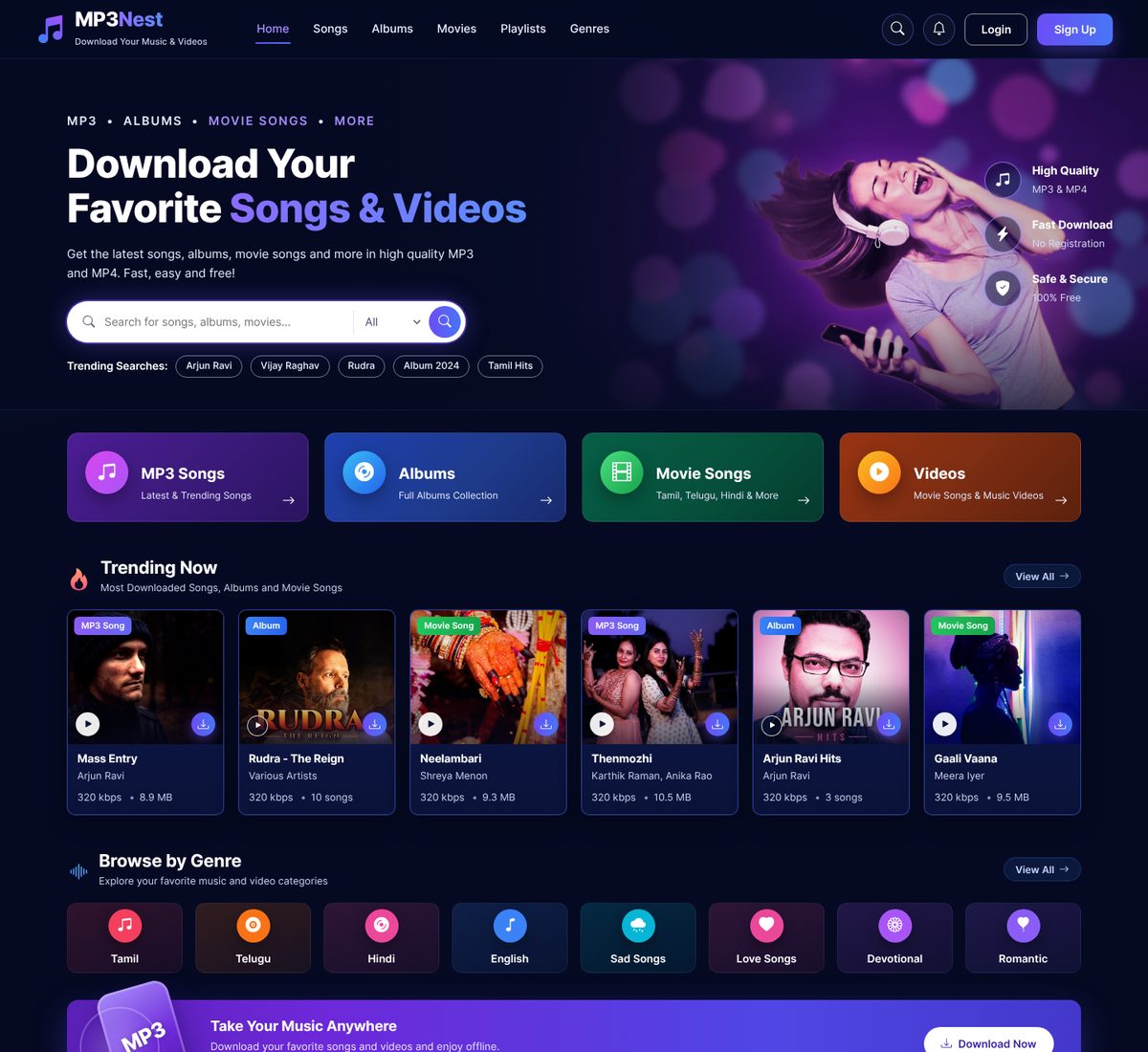
- Home & Layouts: choose Classic or Spotlight for the home page and Classic or Waveform for song pages. The Spotlight hero text, image and trending searches are edited here.
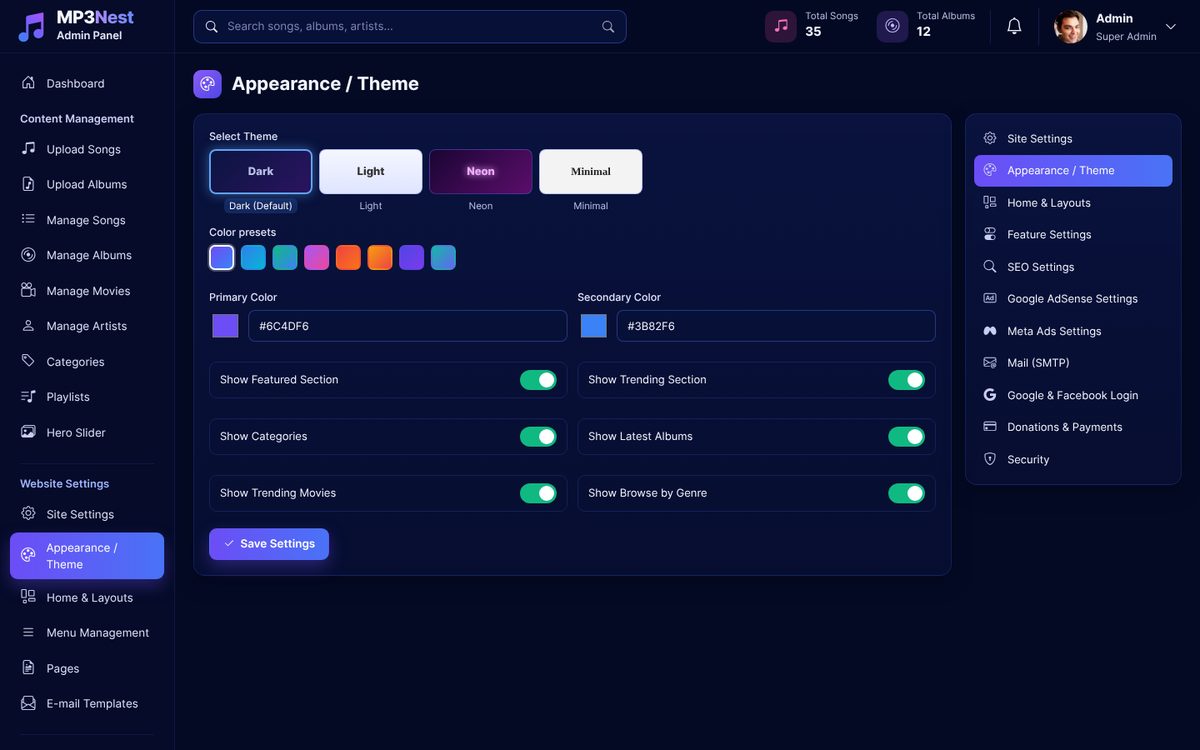
- Appearance: themes Dark, Light, Neon and Minimal, eight colour presets or your own two colours, and switches for every home section.
- Site Settings: site name, tagline, logo, favicon, contact details, social links, copyright and footer note.
- Hero Slider: add slides (1600×640 image, title, tags, two buttons).
Pages & menus
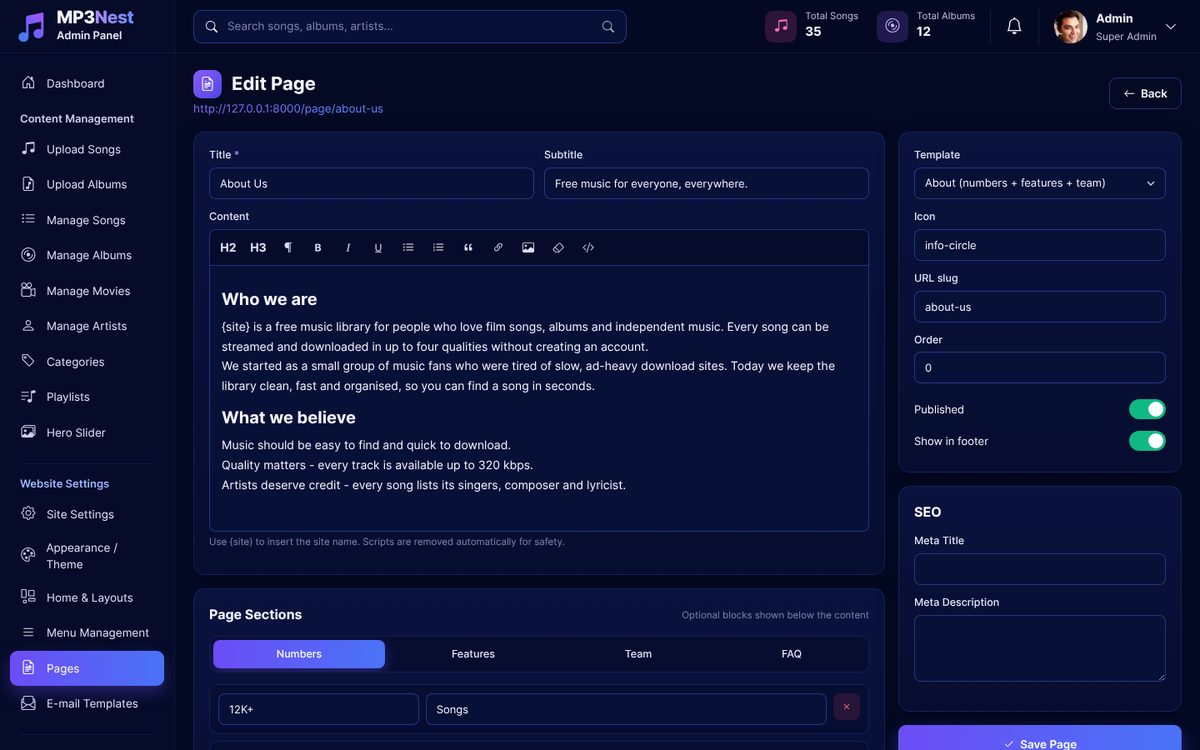
Admin → Pages creates any page in the site design: About, Our Team, Privacy Policy, Terms, DMCA, FAQ or your own. The editor supports headings, lists, links, images and an HTML view. Each page can add optional sections: numbers, feature cards, team members with photos and FAQ (with FAQ schema for Google). Write {site} to insert your site name.
Admin → Menu Management edits the header menu with icons (Classic), the text menu (Spotlight) and the footer links. Drag to reorder.
Members, comments & inbox
- Members sign up with e-mail or Google/Facebook and get a library with favorites, playlists, downloads and history.
- Comments wait for approval unless you switch on "Publish comments without review".
- The inbox collects contact messages (reply by e-mail from the panel) and song requests. When you upload a song with the requested title, the visitor is e-mailed automatically.
- Reports collects DMCA notices and broken-file reports from
/report-content.
Mail (SMTP)
Admin → Mail (SMTP). Enter the details of your mail provider, save, then use "Send Test".
| Provider | Host | Port / Encryption |
|---|---|---|
| Your hosting mailbox | mail.yourdomain.com | 465 / SSL or 587 / TLS |
| Gmail / Google Workspace | smtp.gmail.com | 587 / TLS (use an App Password) |
| Outlook / Microsoft 365 | smtp.office365.com | 587 / TLS |
| Brevo | smtp-relay.brevo.com | 587 / TLS |
| Mailgun | smtp.mailgun.org | 587 / TLS |
| Amazon SES | email-smtp.REGION.amazonaws.com | 587 / TLS |
E-mail templates
Admin → E-mail Templates edits the subject, heading, text and button of every e-mail: welcome, verify e-mail, password reset, donation receipt, bank transfer received, contact reply, song request added, admin login code, newsletter and new report. All e-mails use your logo and colours, and have a live preview.
Donations & payments
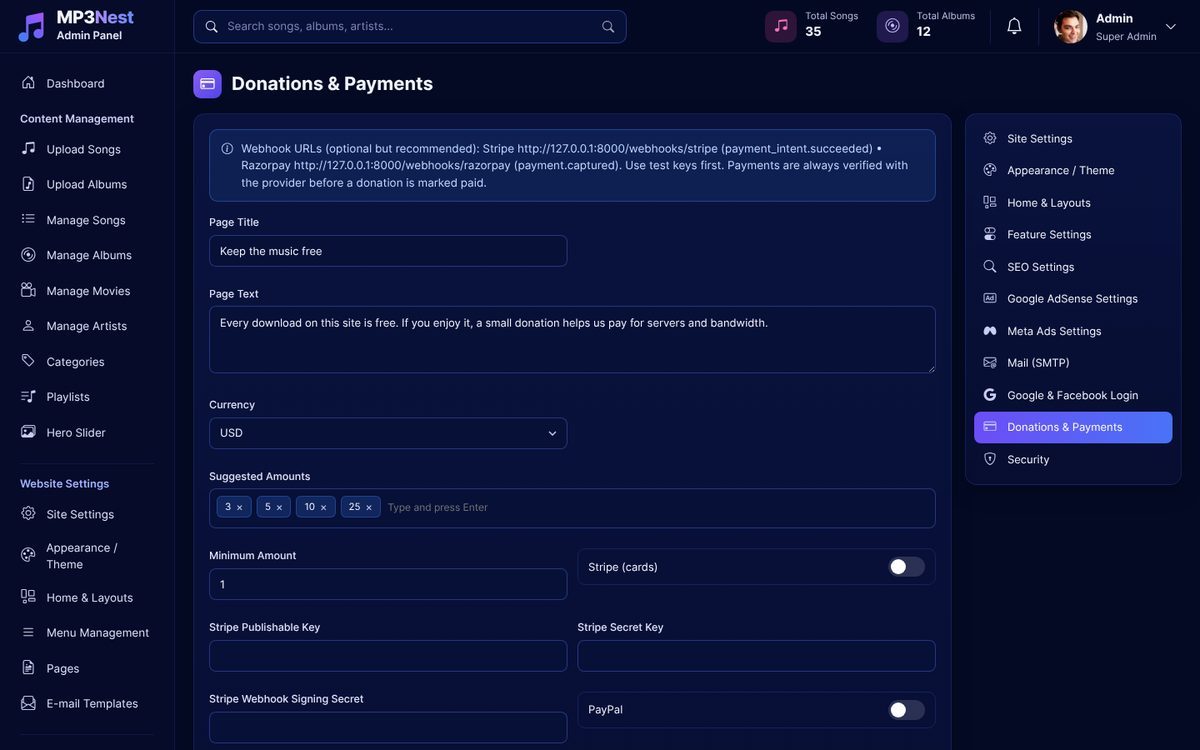
All downloads are free. The optional Support Us page (/support-us) lets visitors donate. Configure it in Admin → Payment Gateways. Start with test keys.
Stripe (cards)
- Stripe Dashboard → Developers → API keys: copy the publishable and secret key.
- Developers → Webhooks → Add endpoint:
https://yourdomain.com/webhooks/stripe, eventpayment_intent.succeeded. Copy the signing secret (whsec_…). - Test card: 4242 4242 4242 4242, any future date and CVC.
PayPal
- developer.paypal.com → Apps & Credentials → create an app, copy the Client ID and Secret.
- Choose Sandbox for testing and Live when you go live.
Razorpay (UPI, cards, wallets)
- Razorpay Dashboard → Settings → API Keys: copy Key ID and Key Secret.
- Settings → Webhooks:
https://yourdomain.com/webhooks/razorpay, eventpayment.captured, and a secret.
Bank transfer
Enter your bank details. The donor sends the money, enters the transaction reference (and optionally a receipt) and you approve it in Admin → Donations.
How payments are protected
- A donation is marked paid only after the server has checked the payment with the provider (Stripe PaymentIntent retrieve, PayPal capture, Razorpay signature + payment API).
- The provider's amount, currency and order reference must match the stored donation exactly.
- Webhooks require a valid signature and answer
400when the secret is missing (fail closed). - Each provider payment ID and each bank reference can complete only one donation (unique database columns and a locked transaction).
- Return pages only accept donations started in the same browser session, and the provider reference must belong to that donation.
- There is no "test mode" that marks payments as paid – use the providers' test keys.
These rules are covered by automated tests in tests/Feature/DonationSecurityTest.php.
Google & Facebook login
Admin → Social Login. Redirect URLs to add in the developer consoles:
https://yourdomain.com/auth/google/callback
https://yourdomain.com/auth/facebook/callback- Google: console.cloud.google.com → APIs & Services → Credentials → OAuth client ID (Web application).
- Facebook: developers.facebook.com → My Apps → Create App → Facebook Login → Settings.
SEO & sitemap
- Every page has a title, description, canonical URL, Open Graph and Twitter tags. Songs, albums, movies, artists and pages have their own SEO fields.
- Structured data: WebSite search box, MusicRecording, MusicAlbum, Movie, Person, FAQPage and BreadcrumbList.
- Sitemap:
/sitemap.xml(index with pages, songs, albums, movies and artists). Submit it in Google Search Console. /robots.txtis generated automatically; add extra rules in SEO Settings.- Google Analytics 4 and Search Console verification are set in SEO Settings.
AdSense & Meta Pixel
Admin → Google AdSense: enter your publisher ID (ca-pub-…), switch on ads and paste ad unit codes into the positions: header, sidebar, in-content, download page and footer. /ads.txt is created from your publisher ID. The download page shows a short countdown (Features → download countdown) so the download ad is seen.
Admin → Meta Ads: add your Facebook Pixel ID to track page views for Facebook and Instagram campaigns.
Security
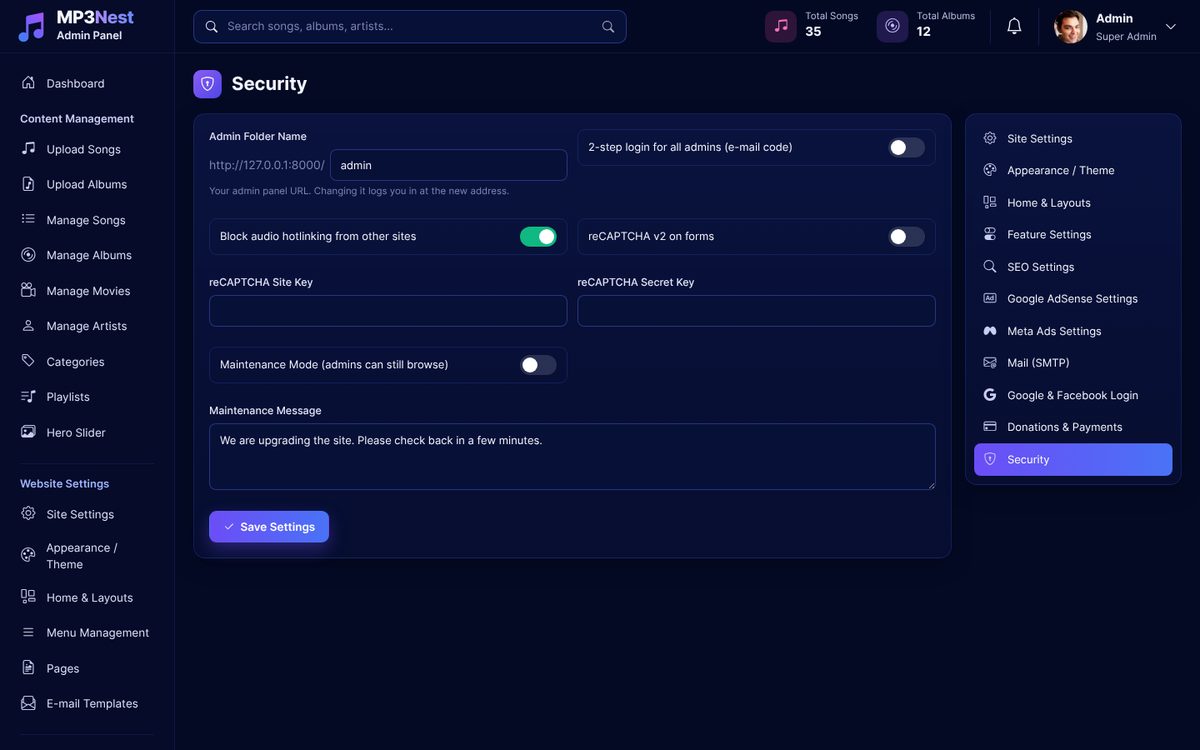
- Admin folder: change the admin URL at any time (Security → Admin Folder Name).
- 2-step login: a 6-digit code by e-mail for all admins or per admin (My Profile).
- Hotlink protection: other websites cannot play your audio.
- reCAPTCHA v2 and a hidden honeypot field on forms; rate limits on login, forms and downloads.
- Uploaded images are re-encoded (removes hidden code and EXIF data); scripts cannot run from
public/uploads. - Page content is cleaned with an allow-list (no scripts or event handlers).
- Security headers (nosniff, frame options, referrer policy) and CSRF protection on every form.
- Maintenance mode shows a friendly page to visitors while admins keep browsing.
- Activity log of admin actions and failed admin logins.
Public demo mode
- Install on a sub-domain with demo content.
- Set
DEMO_MODE=truein.env. - Run
php artisan mp3nest:demo-admin(default logindemo@demo.com / demo1234; change it withDEMO_ADMIN_EMAILandDEMO_ADMIN_PASSWORD). - Add the cron job – the demo content resets every three hours (
php artisan mp3nest:demo-reset).
In demo mode every save button in the admin panel is blocked, and the demo member (user@demo.com / password) cannot change its e-mail or password. Login pages show a "Fill" button with the demo logins.
Translation
All texts are translatable. Copy lang/es.json (Spanish example) to a new file such as lang/fr.json, translate the values, then choose the default language in Site Settings. With "Enable Multi-Language" on, visitors get a language selector in the footer.
Customising the design
- Styles:
public/assets/css/app.css(website) andadmin.css(panel). Colours are CSS variables, so most changes need only the colour settings. - Templates:
resources/views(Blade). No build tools are required – edit and refresh. - Icons: Bootstrap Icons – any icon name from icons.getbootstrap.com works in genres, menus and pages.
Updating
- Back up the database (Admin → Backup & Restore) and the
public/uploadsandstorage/app/privatefolders. - Upload the new files over the old ones, but keep your
.envfile and the two folders above. - Run
php artisan migrate --force(or ask your host), then clear the cache in Admin → System Settings.
Troubleshooting
| Problem | Solution |
|---|---|
| 500 error after upload | Check PHP 8.3+, folder permissions and that vendor/ was uploaded. Set APP_DEBUG=true in .env briefly to see the message, then switch it off again. |
| Uploads fail for big MP3/ZIP files | Increase upload_max_filesize, post_max_size and max_execution_time in your PHP settings. |
| E-mails are not sent | Use Mail (SMTP) → Send Test. With the driver on "Log only" e-mails go to storage/logs. |
| Pages show 404 except the home page | Enable mod_rewrite or point the document root to /public. |
| Forgot the admin folder | Open .env and look at ADMIN_PATH. |
| Forgot the admin password | Use a second admin, or run php artisan tinker and update the admins table. |
| Storage test fails | Check the keys, bucket name and region. R2 needs the Account ID. FTP: the folder must exist and passive mode is usually needed. Some hosts block outgoing FTP/SFTP ports. |
| Browser upload to the bucket fails | Add the CORS rule from the Storage page to the bucket, or switch "Upload from the browser" off (big files are then sent in parts to your server). |
| Album ZIP download fails | The PHP Zip extension is required (System Settings shows its status). |
Credits & licences
- Laravel framework and PHP libraries (Symfony, Carbon, Guzzle and others) – MIT licence.
- Laravel Socialite, stripe-php, razorpay-php, Flysystem – MIT licence. AWS SDK for PHP – Apache 2.0. phpseclib – MIT licence. getID3 – GPL / LGPL / MPL (multi-licensed).
- Bootstrap Icons – MIT licence. Inter font – SIL Open Font Licence.
- Demo photos – CC0 (StockSnap / Openverse) and the Unsplash Licence, listed with links in
public/uploads/demo/CREDITS.txt. Demo audio – CC BY, listed indatabase/demo/audio/CREDITS.txt. Demo content is for the demo only; replace it with your own content. - All song, album, movie and artist names in the demo are fictional.
Changelog
Version 1.0.0 – Initial release.